# zkSync Era∎ Use Guide

### <mark style="color:orange;">**How to create a**</mark> <mark style="color:orange;"></mark><mark style="color:orange;">zkSync Era∎</mark> <mark style="color:orange;"></mark><mark style="color:orange;">**wallet in TokenPocket?**</mark> <a href="#how-to-create-an-etc-wallet-in-tokenpocket" id="how-to-create-an-etc-wallet-in-tokenpocket"></a>

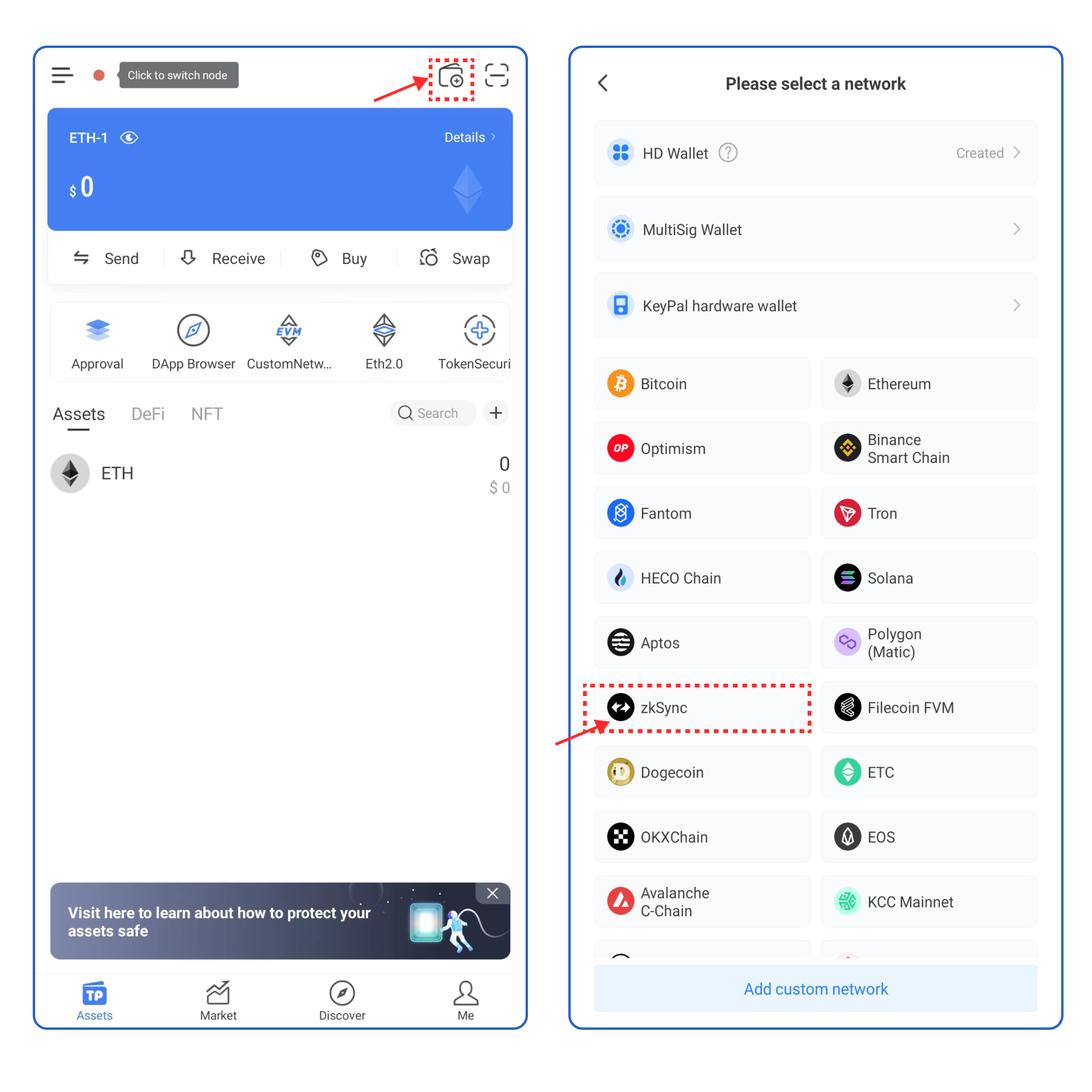
1. Open TokenPocket APP, click ![](https://files.gitbook.com/v0/b/gitbook-x-prod.appspot.com/o/spaces%2F-MMJyYRLFVRsMrfcXuRV%2Fuploads%2FirO5jMjruPh19549ag1R%2Fimage.png?alt=media\&token=db14329a-ece4-4e2a-bb3e-c64d39cc084e) on the upper right corner, and select zkSync Era∎;

<figure><img src="https://files.gitbook.com/v0/b/gitbook-x-prod.appspot.com/o/spaces%2F-MMJyYRLFVRsMrfcXuRV%2Fuploads%2FDGkUE5hlUEaPdj9hoSpY%2Fen1.png?alt=media&#x26;token=8b70b448-5b99-4e43-9255-7d1a5b3baa49" alt=""><figcaption></figcaption></figure>

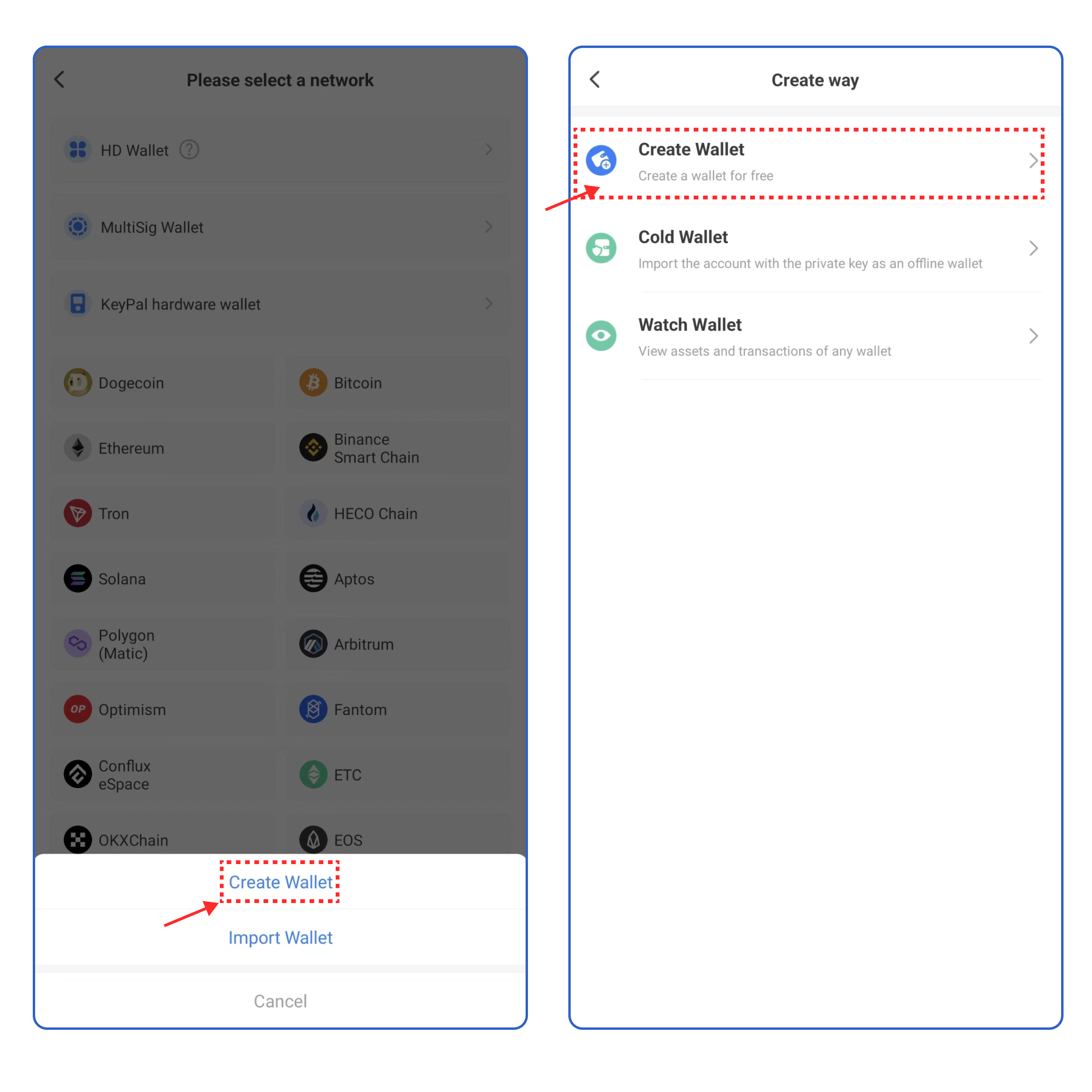
2\. Click **\[Create Wallet]**  and click **\[Create Wallet]** again;

<figure><img src="https://files.gitbook.com/v0/b/gitbook-x-prod.appspot.com/o/spaces%2F-MMJyYRLFVRsMrfcXuRV%2Fuploads%2Fso9OxZmh8axc16fdSqoT%2Fimage.png?alt=media&#x26;token=f4c8cf79-c6be-4792-aaa7-d1d73fba5fe5" alt=""><figcaption></figcaption></figure>

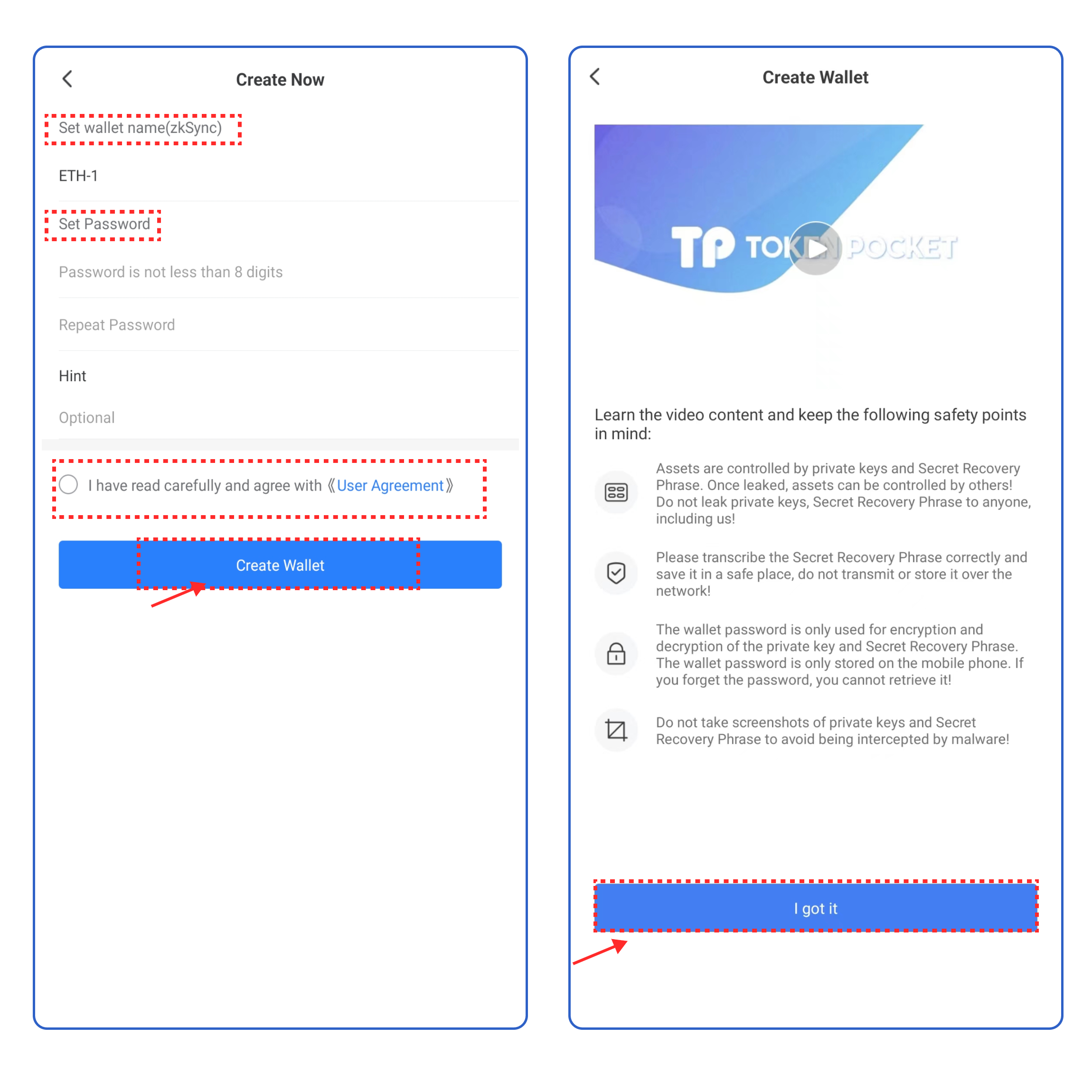
3\. Set the wallet name and password, click the User Agreement, and click **\[Create Wallet].** Watch and learn the video content, click **\[I got it].**

<figure><img src="https://files.gitbook.com/v0/b/gitbook-x-prod.appspot.com/o/spaces%2F-MMJyYRLFVRsMrfcXuRV%2Fuploads%2FPaniLePGKowNqXdLcjl2%2Fen%202.png?alt=media&#x26;token=c7d33e26-4d97-4643-96d2-7ad8adb5bdc3" alt=""><figcaption></figcaption></figure>

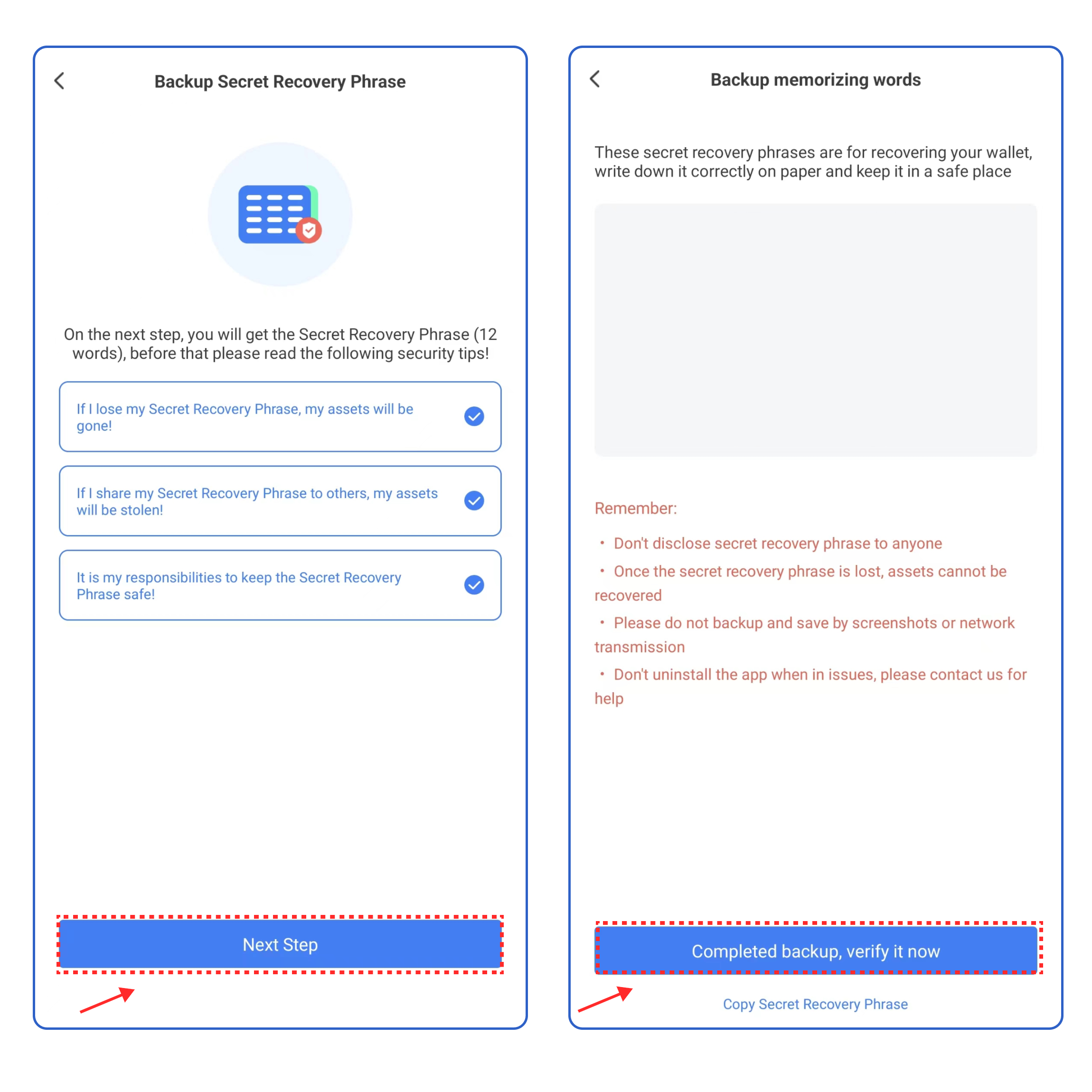
4\.  Select the security tips, and click **\[Next Step]**. Back up the secret recovery phrase on the paper or on the [**KeyPal**](https://www.keypal.pro/en/), and store it in a safe place. Click **\[Completed backup, verify now]** .

<figure><img src="https://files.gitbook.com/v0/b/gitbook-x-prod.appspot.com/o/spaces%2F-MMJyYRLFVRsMrfcXuRV%2Fuploads%2FAdmgAS04lotpCPSoKRTV%2Fimage.png?alt=media&#x26;token=96af2003-3d4e-45ea-b20c-facad630bd8e" alt=""><figcaption></figcaption></figure>

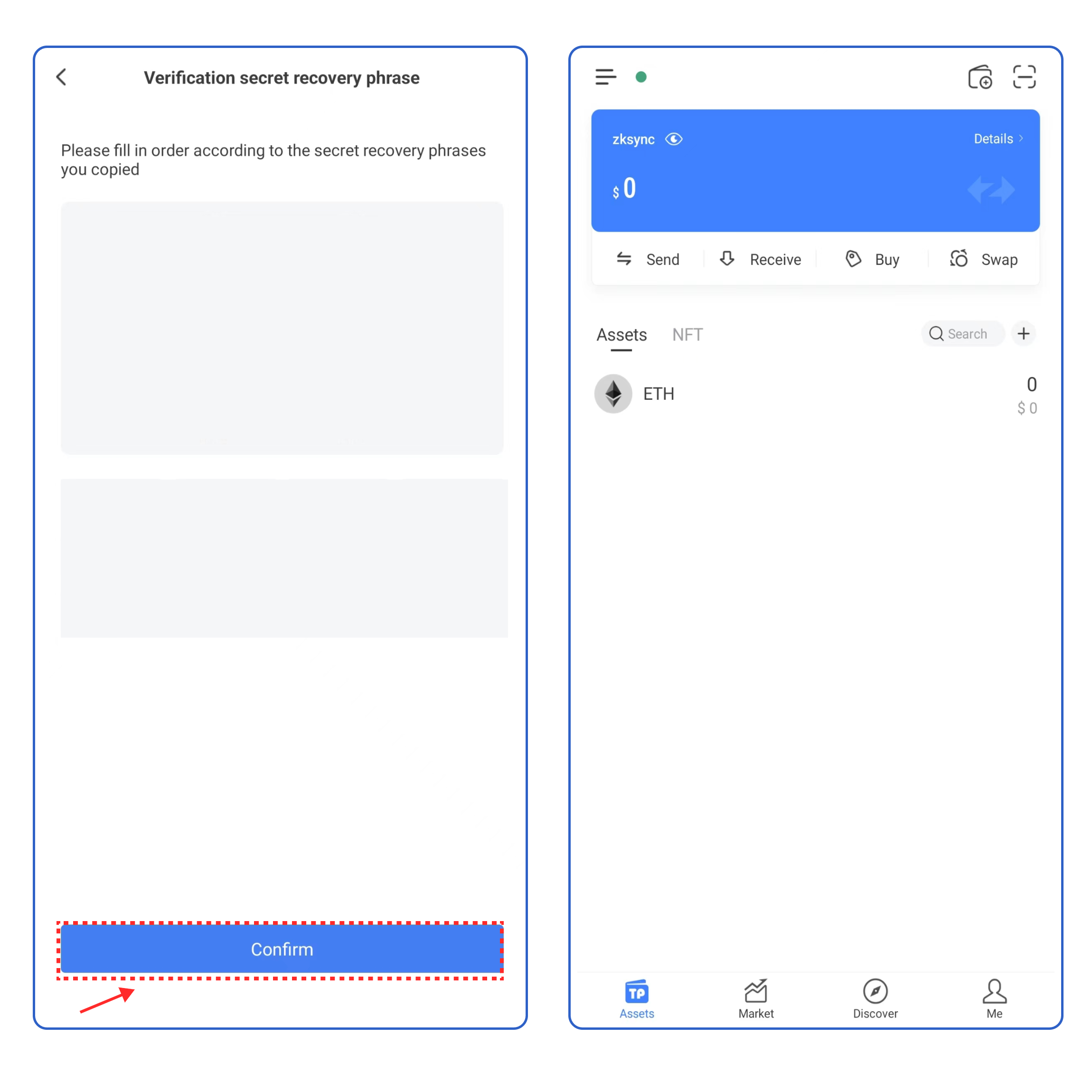
5\. Enter your secret recovery phrase, and click **\[Confirm].** At this point, you have successfully created a zkSync Era∎ wallet.

<mark style="color:red;">**Attention: Do not disclose the private key or secret recovery phrase to the third party!**</mark>

<figure><img src="https://files.gitbook.com/v0/b/gitbook-x-prod.appspot.com/o/spaces%2F-MMJyYRLFVRsMrfcXuRV%2Fuploads%2FpuCwXpbO8cXHyaiTwnET%2Fen%203.png?alt=media&#x26;token=ede57607-afc7-466c-902b-40e95fb0907e" alt=""><figcaption></figcaption></figure>

### <mark style="color:orange;">**How to import a**</mark> <mark style="color:orange;"></mark><mark style="color:orange;">zkSync Era∎</mark> <mark style="color:orange;"></mark><mark style="color:orange;">**wallet into TokenPocket?**</mark> <a href="#how-to-import-an-etc-wallet-into-tokenpocket" id="how-to-import-an-etc-wallet-into-tokenpocket"></a>

1. Open TokenPocket APP, click![](https://files.gitbook.com/v0/b/gitbook-x-prod.appspot.com/o/spaces%2F-MMJyYRLFVRsMrfcXuRV%2Fuploads%2FirO5jMjruPh19549ag1R%2Fimage.png?alt=media\&token=db14329a-ece4-4e2a-bb3e-c64d39cc084e) on the upper right corner, and select zkSync Era∎**;**

<figure><img src="https://files.gitbook.com/v0/b/gitbook-x-prod.appspot.com/o/spaces%2F-MMJyYRLFVRsMrfcXuRV%2Fuploads%2FDGkUE5hlUEaPdj9hoSpY%2Fen1.png?alt=media&#x26;token=8b70b448-5b99-4e43-9255-7d1a5b3baa49" alt=""><figcaption></figcaption></figure>

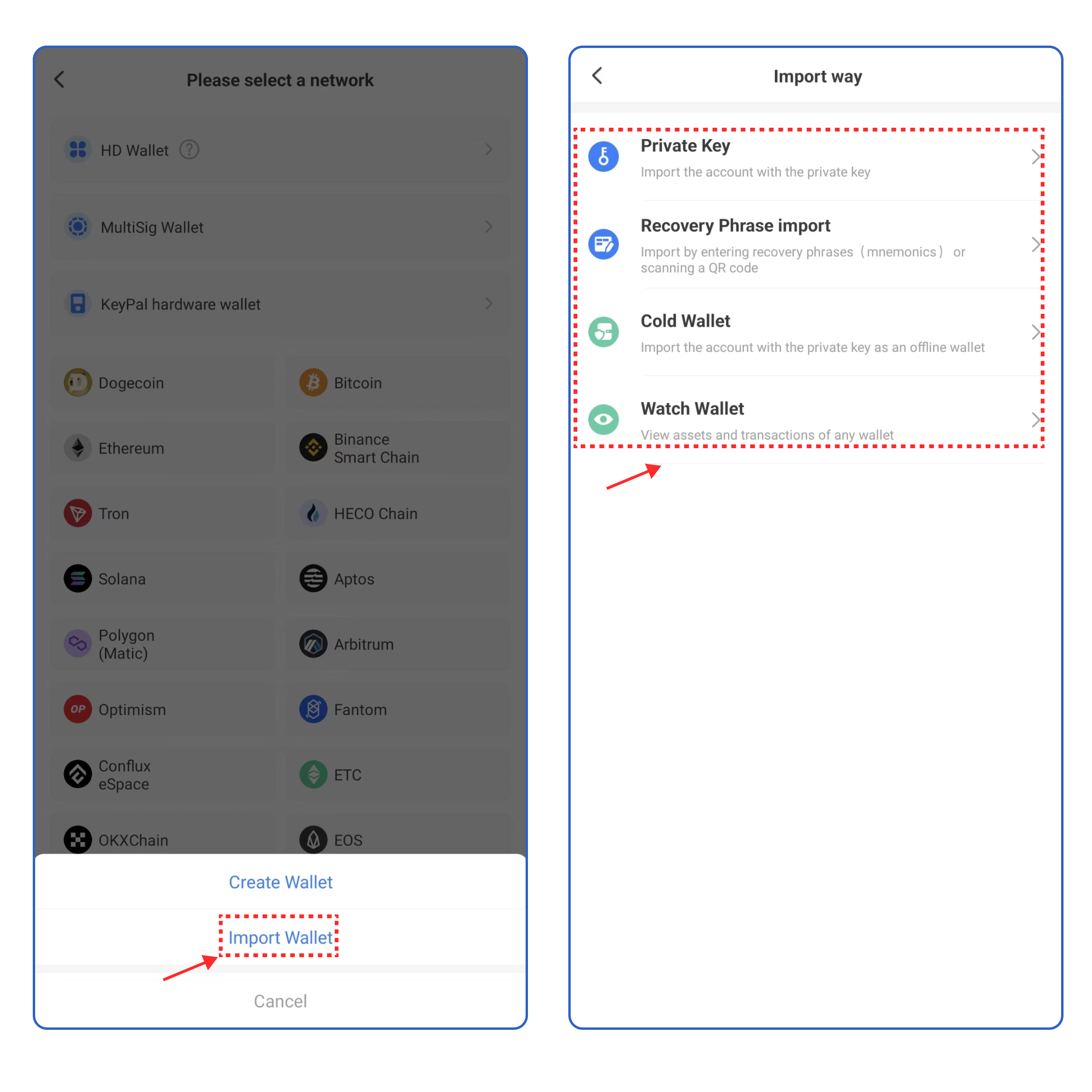
2\. Click **\[Import Wallet]**, and select the way you want to import your wallet.

<figure><img src="https://files.gitbook.com/v0/b/gitbook-x-prod.appspot.com/o/spaces%2F-MMJyYRLFVRsMrfcXuRV%2Fuploads%2Fac0pdjSEZOuS13sB2X5t%2Fimage.png?alt=media&#x26;token=133021c7-98e1-4024-bcd2-80d767883c43" alt=""><figcaption></figcaption></figure>

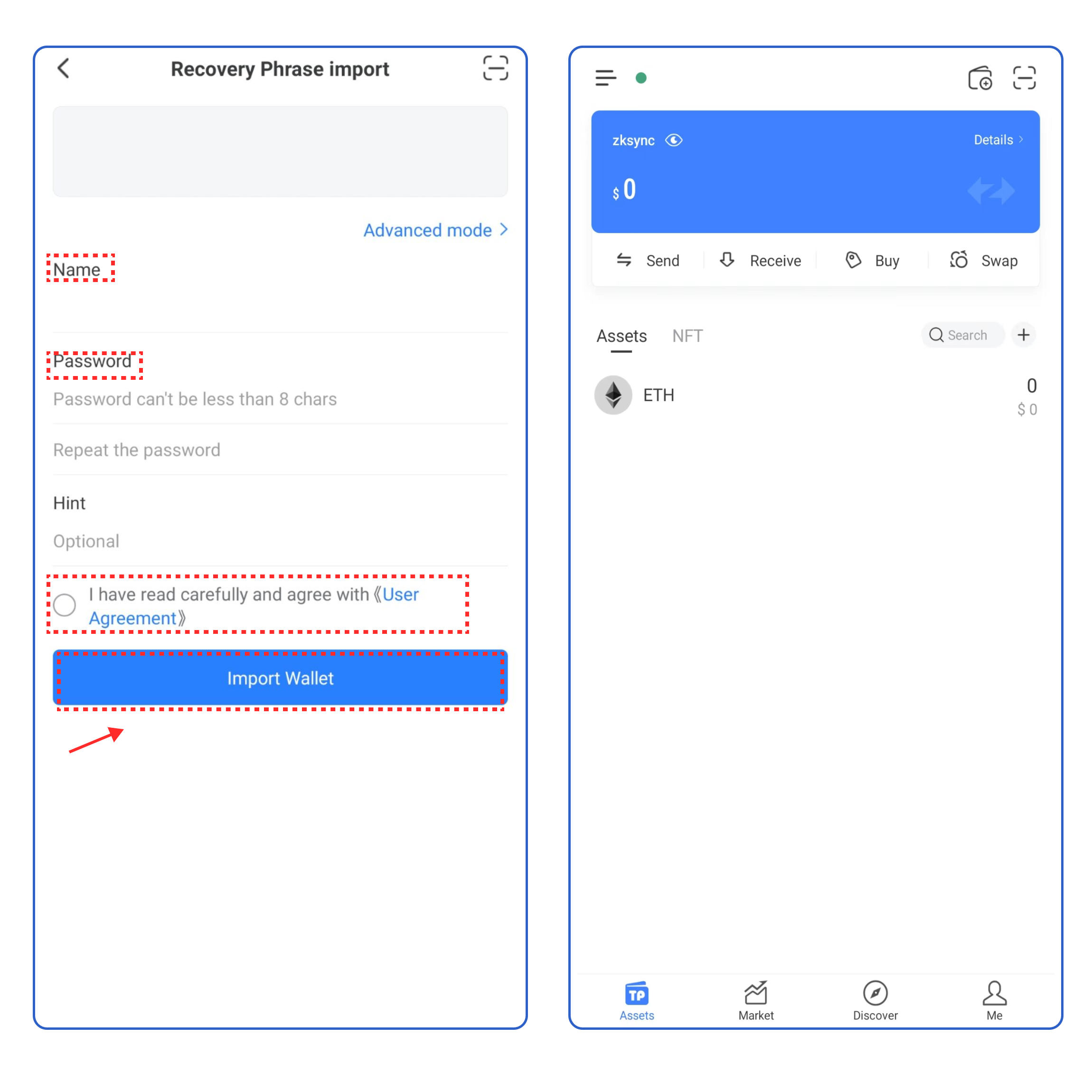
3\. Take **\[Recovery Phrase import]** as an example, enter your secret recovery phrase, wallet name, and password, click the User Agreement, and click **\[Import Wallet]**. At this point, you have successfully imported a zkSync Era∎ wallet.​​

<figure><img src="https://files.gitbook.com/v0/b/gitbook-x-prod.appspot.com/o/spaces%2F-MMJyYRLFVRsMrfcXuRV%2Fuploads%2Fb1rMTqRHle7iipbSB7vT%2F%E8%8B%B1.png?alt=media&#x26;token=312834e7-d6ec-4e09-bccf-feec7849c5db" alt=""><figcaption></figcaption></figure>