# How to Create and Import Eclipse Wallet on TokenPocket

**TokenPocket** [**Mobile Wallet**](https://www.tokenpocket.pro/en/download/app) **now support Eclipse network. (Android Version Above 2.4.1, iOS Soon)**

## <mark style="color:orange;">**How to create a Eclipse wallet in TokenPocket?**</mark> <a href="#how-to-create-an-etc-wallet-in-tokenpocket-1" id="how-to-create-an-etc-wallet-in-tokenpocket-1"></a>

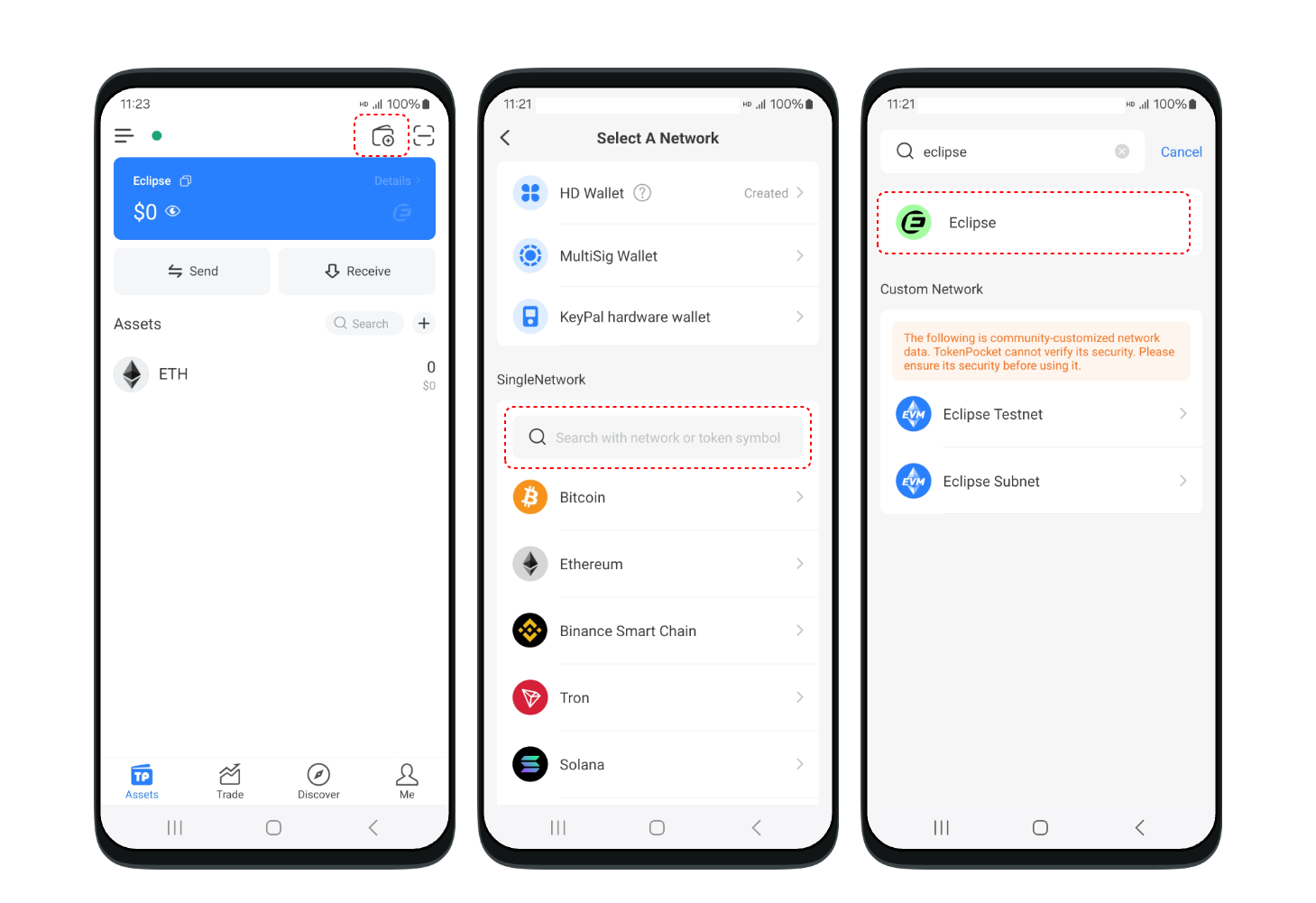
1. Open the TokenPocket APP, click ![](https://help.tokenpocket.pro/~gitbook/image?url=https%3A%2F%2F659607907-files.gitbook.io%2F%7E%2Ffiles%2Fv0%2Fb%2Fgitbook-x-prod.appspot.com%2Fo%2Fspaces%252F-MMJyYRLFVRsMrfcXuRV%252Fuploads%252FUjYAAs2G6BZ8CNsYXCiH%252Fimage.png%3Falt%3Dmedia%26token%3D9adac656-510e-4346-8334-d99ad71f1417\&width=300\&dpr=4\&quality=100\&sign=51b8ebd8\&sv=1) on the upper right corner, click the search bar, and enter **Eclipse;**

<figure><img src="https://2634619309-files.gitbook.io/~/files/v0/b/gitbook-x-prod.appspot.com/o/spaces%2F3qtItoZih7cEdFc6kPNk%2Fuploads%2FeKIw09Z6EeuJjvWUu4UB%2Fen1%401x.png?alt=media&#x26;token=464b7c0e-9c06-4679-bbce-9677b141653a" alt=""><figcaption></figcaption></figure>

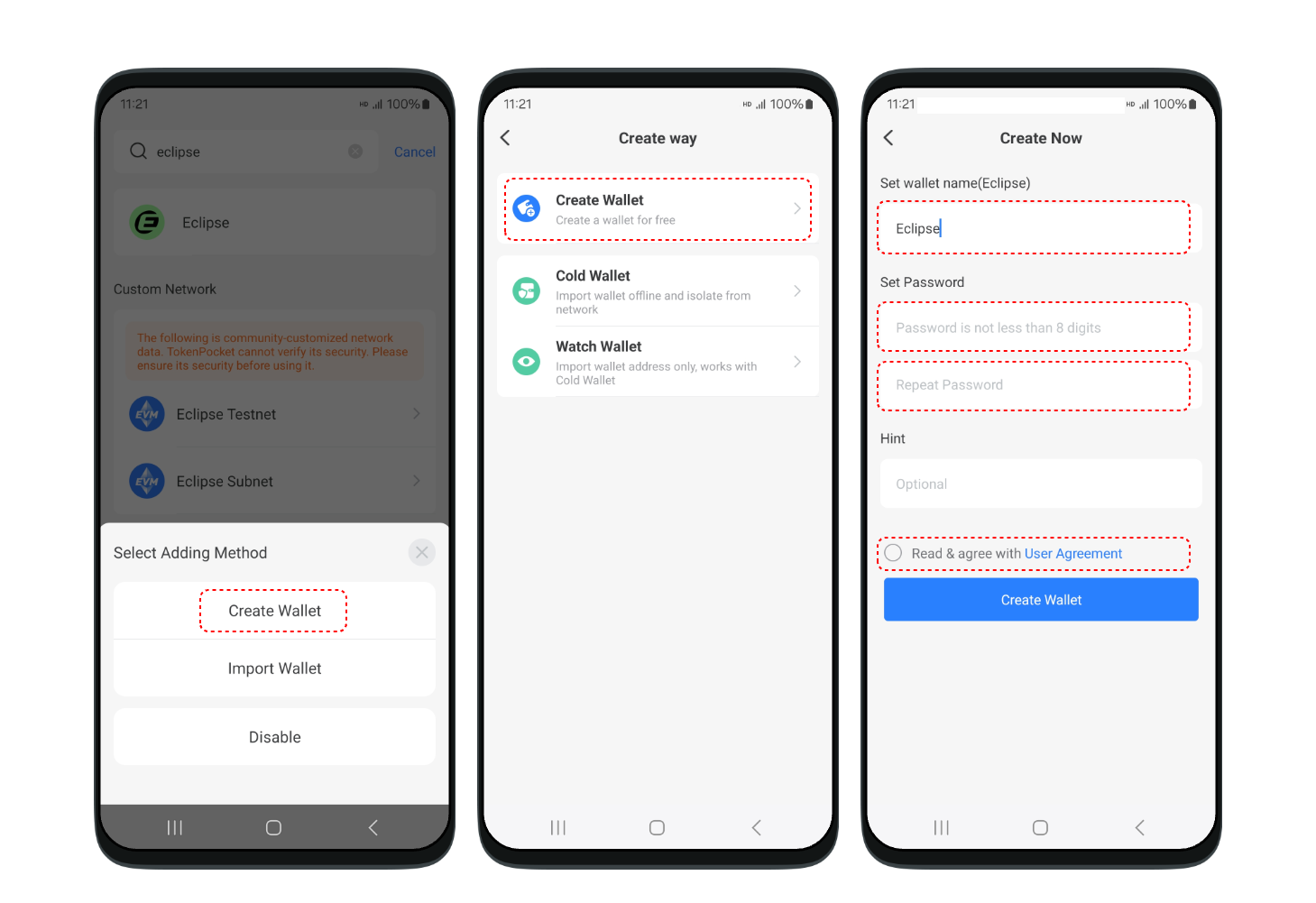
2. <mark style="color:purple;">>Android Version.</mark> Click **\[Eclipse]** and click **\[Eclipse]** after the 1st step, then set your wallet name, password, and so on. Follow the steps below.

<figure><img src="https://2634619309-files.gitbook.io/~/files/v0/b/gitbook-x-prod.appspot.com/o/spaces%2F3qtItoZih7cEdFc6kPNk%2Fuploads%2FFpVnqythkJXTrh7Y3OVR%2Fen2%401x.png?alt=media&#x26;token=426450f9-232b-446c-93e5-b1e382acf1c2" alt=""><figcaption></figcaption></figure>

<mark style="color:purple;">>iOS Version.</mark> Coming Soon

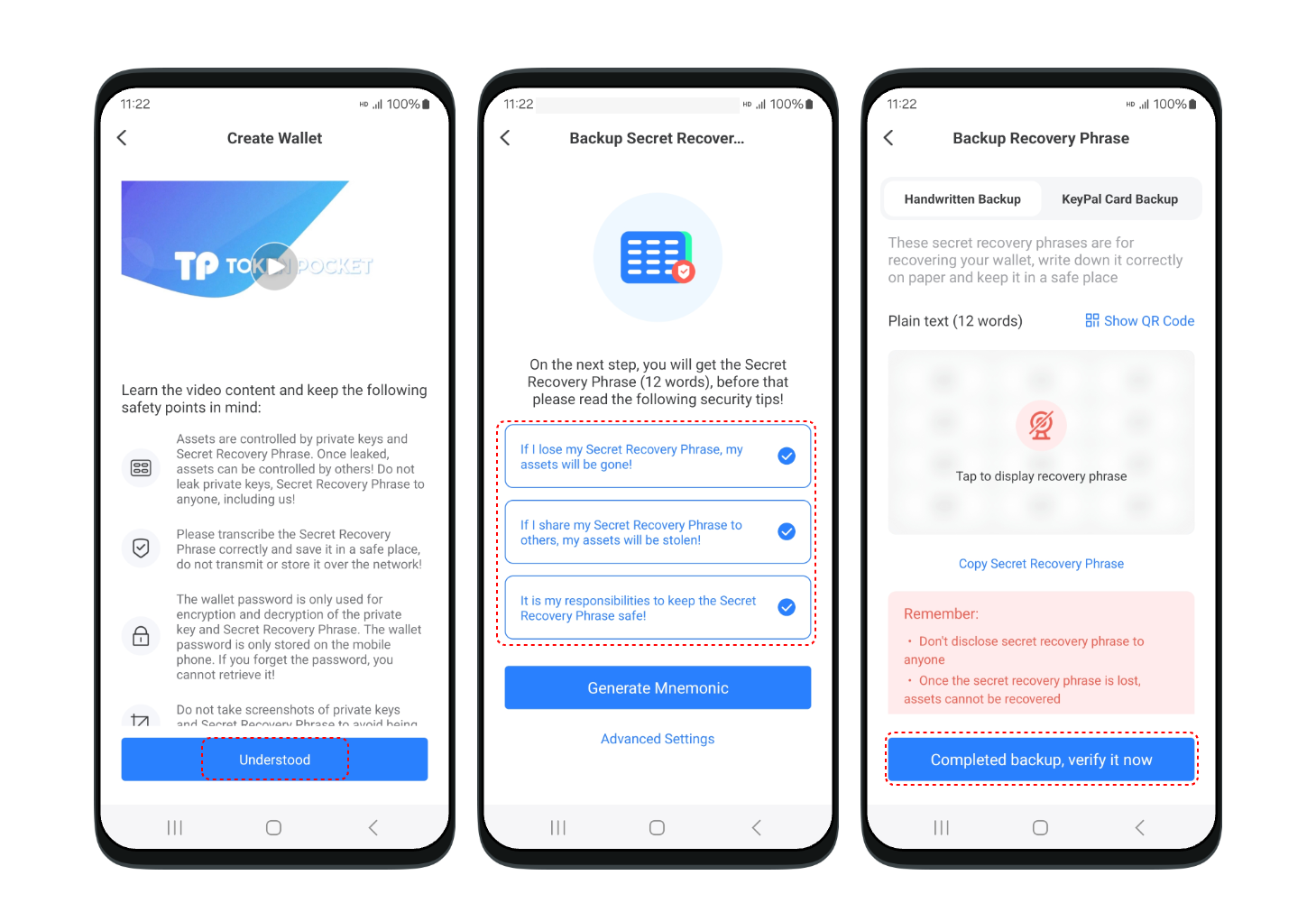
3. Back up the secret recovery phrase on the paper, and store it in a safe place. Click **\[Completed backup]** .

<figure><img src="https://2634619309-files.gitbook.io/~/files/v0/b/gitbook-x-prod.appspot.com/o/spaces%2F3qtItoZih7cEdFc6kPNk%2Fuploads%2FvKH733HXjorFgT3MovaK%2Fen3%401x.png?alt=media&#x26;token=82a6c499-b57a-471e-bff9-b0b7ed345bfe" alt=""><figcaption></figcaption></figure>

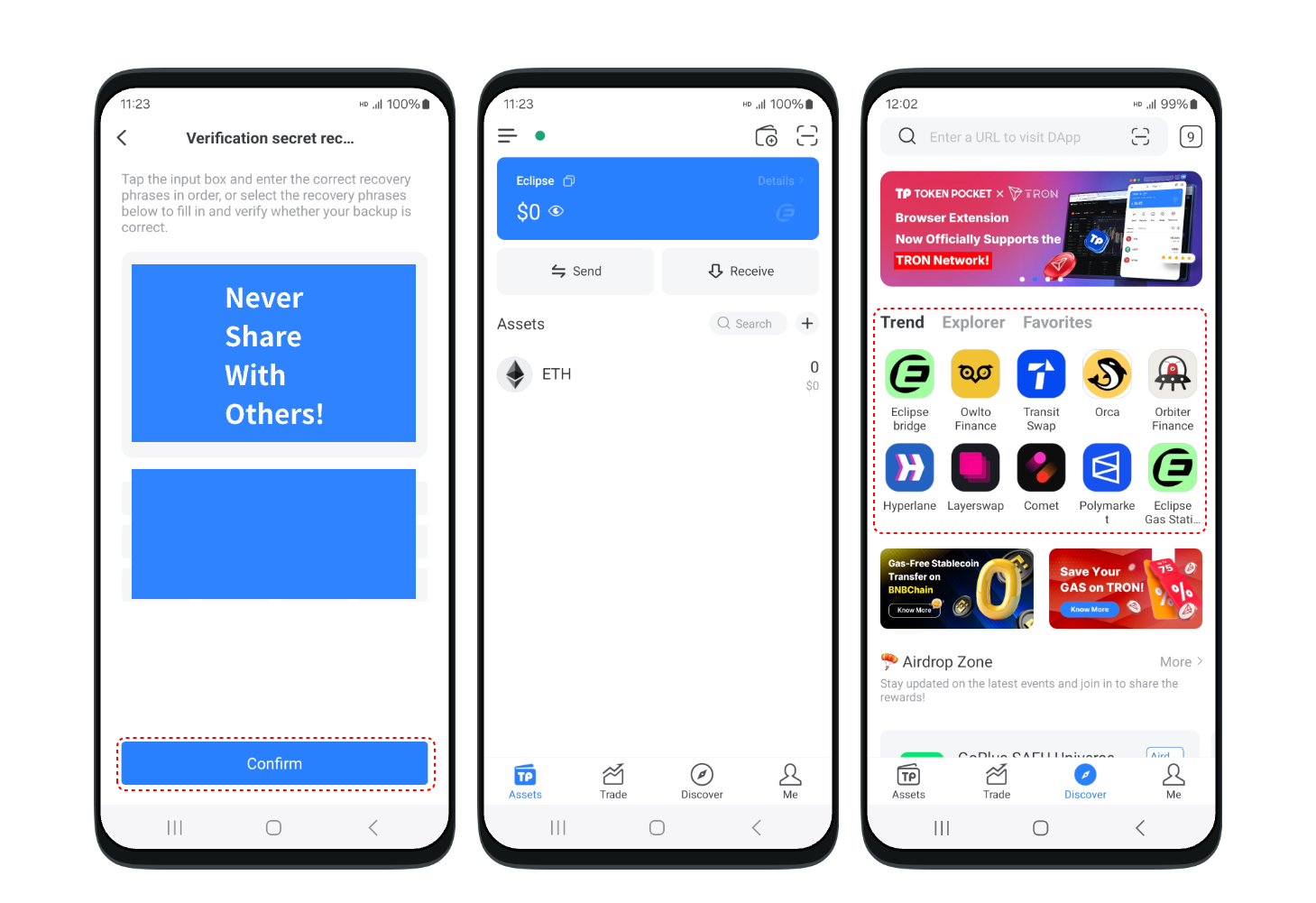
4. Verify your secret recovery phrase. At this point, you have successfully created a **Eclipse** wallet. You can store **Eclipse** assets, swap\&bridge, and discover the **Eclipse** ecosystem on TokenPocket from now on!

<mark style="color:red;">**Attention: Do not disclose the private key or secret recovery phrase to the third party!**</mark>

<figure><img src="https://2634619309-files.gitbook.io/~/files/v0/b/gitbook-x-prod.appspot.com/o/spaces%2F3qtItoZih7cEdFc6kPNk%2Fuploads%2Fb20t7rviYn50H6yunc8D%2Fen4%401x.png?alt=media&#x26;token=3c26ccaf-8ad1-42c6-84d7-bf6e4f8affe1" alt=""><figcaption></figcaption></figure>

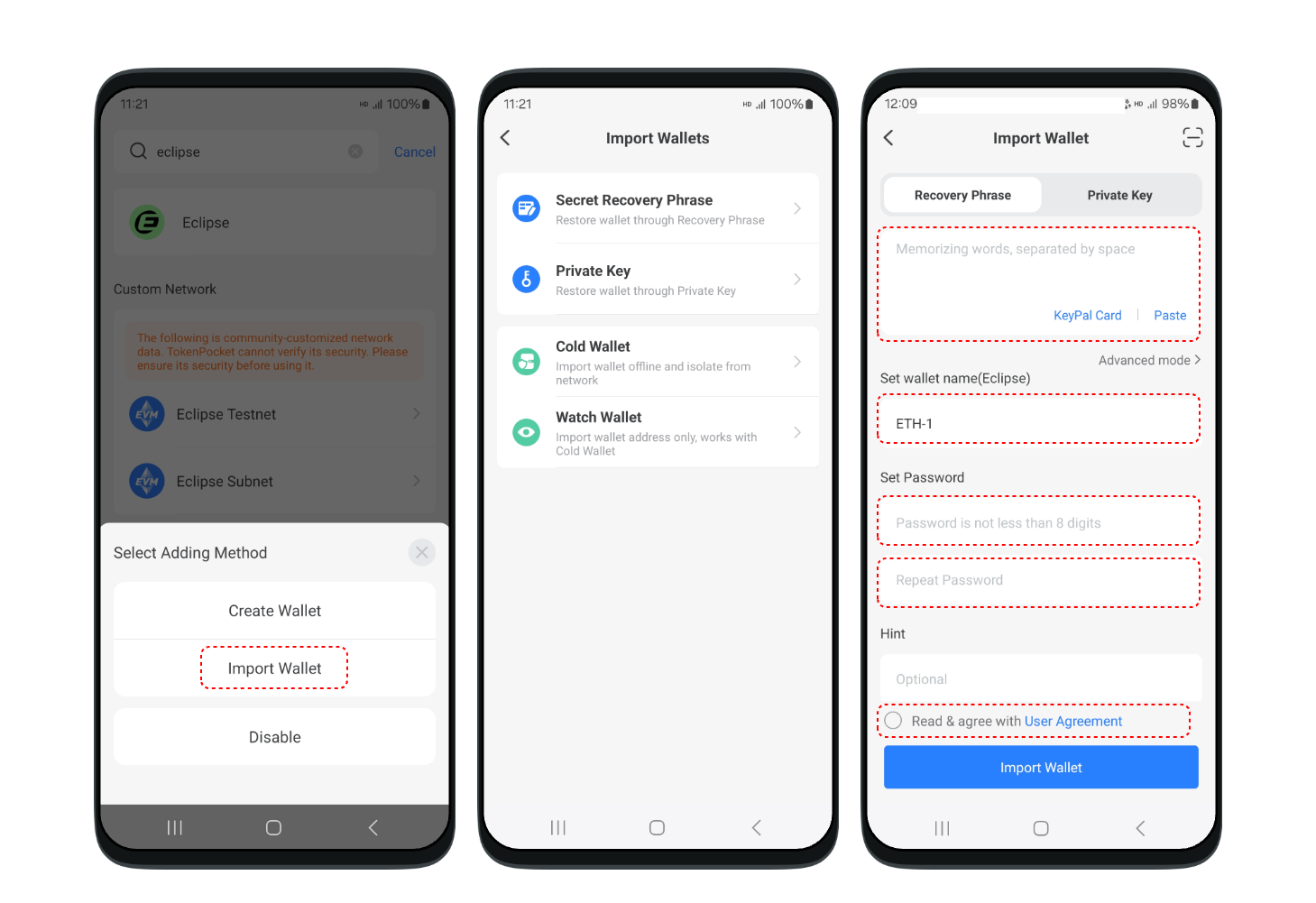
## <mark style="color:orange;">**How to import a Eclipse wallet in TokenPocket?**</mark> <a href="#how-to-create-an-etc-wallet-in-tokenpocket-1" id="how-to-create-an-etc-wallet-in-tokenpocket-1"></a>

1. Open the TokenPocket APP, click ![](https://help.tokenpocket.pro/~gitbook/image?url=https%3A%2F%2F659607907-files.gitbook.io%2F%7E%2Ffiles%2Fv0%2Fb%2Fgitbook-x-prod.appspot.com%2Fo%2Fspaces%252F-MMJyYRLFVRsMrfcXuRV%252Fuploads%252FUjYAAs2G6BZ8CNsYXCiH%252Fimage.png%3Falt%3Dmedia%26token%3D9adac656-510e-4346-8334-d99ad71f1417\&width=300\&dpr=4\&quality=100\&sign=51b8ebd8\&sv=1) on the upper right corner, click the search bar, and enter **Eclipse**;

<figure><img src="https://2634619309-files.gitbook.io/~/files/v0/b/gitbook-x-prod.appspot.com/o/spaces%2F3qtItoZih7cEdFc6kPNk%2Fuploads%2FeKIw09Z6EeuJjvWUu4UB%2Fen1%401x.png?alt=media&#x26;token=464b7c0e-9c06-4679-bbce-9677b141653a" alt=""><figcaption></figcaption></figure>

\
2\. Click **【Import Wallet】**, select **\[Recovery Phrase].** Enter your secret recovery phrase, set your wallet name, and click confirm.&#x20;

<figure><img src="https://2634619309-files.gitbook.io/~/files/v0/b/gitbook-x-prod.appspot.com/o/spaces%2F3qtItoZih7cEdFc6kPNk%2Fuploads%2FM5ff0KaENwOdKbMtHAtA%2Fen%205%401x.png?alt=media&#x26;token=f81c080a-88c0-421d-b1f2-5582a30cab68" alt=""><figcaption></figcaption></figure>

3. At this point, you have successfully imported a **Eclipse** wallet.&#x20;

<figure><img src="https://2634619309-files.gitbook.io/~/files/v0/b/gitbook-x-prod.appspot.com/o/spaces%2F3qtItoZih7cEdFc6kPNk%2Fuploads%2F7tQ47DtJHzt1DLPyL95L%2Fen6%401x%20(1).png?alt=media&#x26;token=474f3a1b-a694-429e-90b7-ac8df07e24e3" alt=""><figcaption></figcaption></figure>

## <mark style="color:orange;">Extension Wallet Tutorial</mark>

Coming Soon.