> For the complete documentation index, see [llms.txt](https://help.tpwallet.io/en/llms.txt). Markdown versions of documentation pages are available by appending `.md` to page URLs; this page is available as [Markdown](https://help.tpwallet.io/en/wallet-operation/how-to-create-a-wallet/blast.md).

# Blast Testnet Use Guide

### Mobile Wallet Tutorial&#x20;

### How to add the Blast Testnet on TokenPocket

1. Open the TokenPocket APP, click on the top right corner, and enter "Blast" in the search bar of the list.

<figure><img src="https://659607907-files.gitbook.io/~/files/v0/b/gitbook-x-prod.appspot.com/o/spaces%2F-MMJyYRLFVRsMrfcXuRV%2Fuploads%2FNcHlHkxRUb63a3wVnjrw%2F1.png?alt=media&#x26;token=46b67b0f-43c4-48e9-989f-758d37680380" alt=""><figcaption></figcaption></figure>

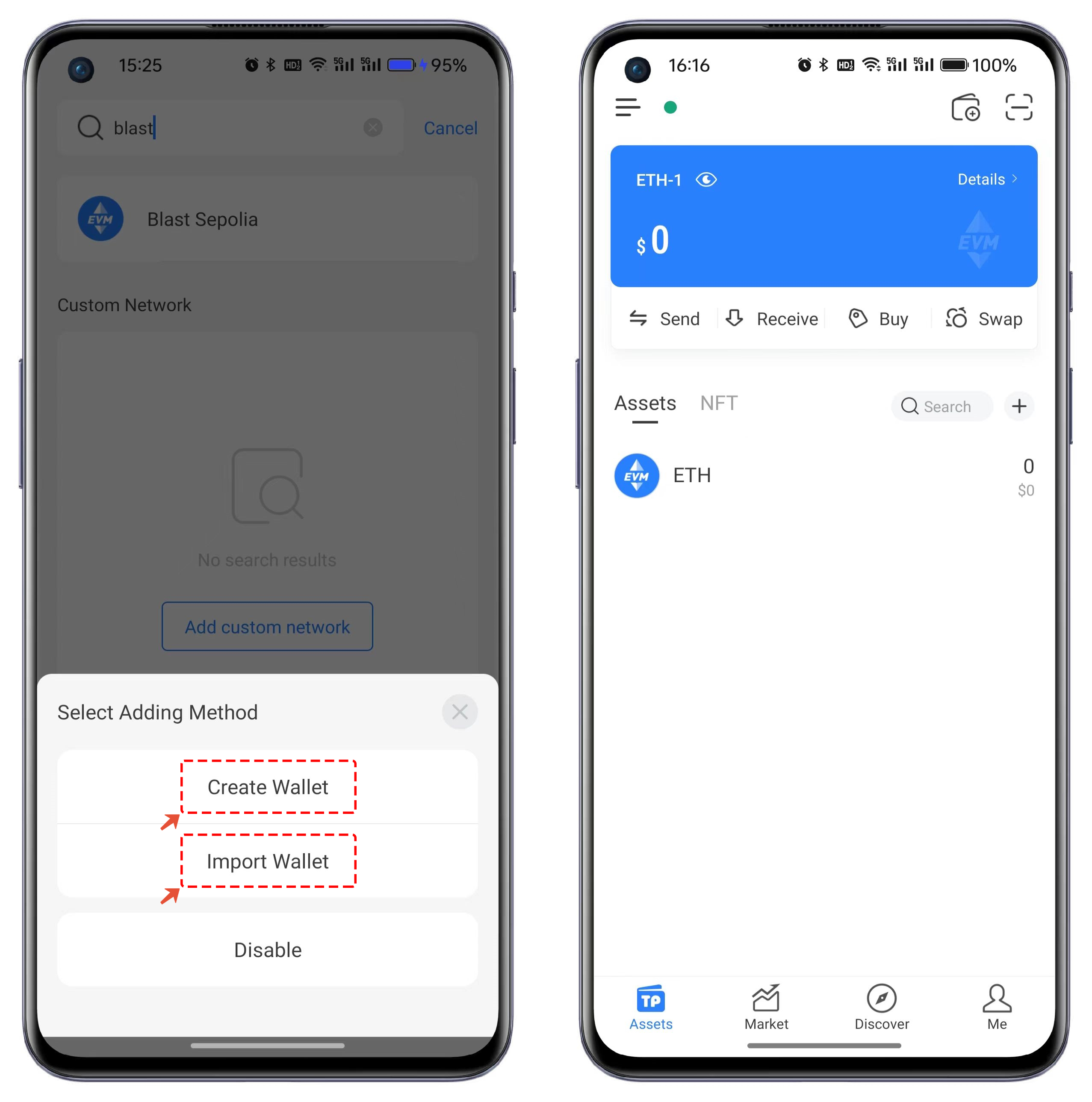
2. View the search results and click on Blast Sepolia Testnet. In the popped-up interface, choose either "Create Wallet" or "Import Wallet" to create a Blast wallet.

<figure><img src="https://files.gitbook.com/v0/b/gitbook-x-prod.appspot.com/o/spaces%2F-MMJyYRLFVRsMrfcXuRV%2Fuploads%2FtIUWnBzkPOrazcjf0wLl%2F3.png?alt=media&#x26;token=5fb73d8f-b46b-4da9-82b7-4b0f1f98a077" alt=""><figcaption></figcaption></figure>

### Plugin Wallet Tutorial:

1. Open the TokenPocket plugin wallet and click on the top-left corner's blockchain option. Select the "Custom RPC" function.

<figure><img src="https://659607907-files.gitbook.io/~/files/v0/b/gitbook-x-prod.appspot.com/o/spaces%2F-MMJyYRLFVRsMrfcXuRV%2Fuploads%2FTASeJavPdqAui8NOEvdg%2F1.png?alt=media&#x26;token=59bc091e-b83e-483b-9b72-a5a30df5a0b9" alt=""><figcaption></figcaption></figure>

2. Click on "Shortcut Link" in the network.

<figure><img src="https://659607907-files.gitbook.io/~/files/v0/b/gitbook-x-prod.appspot.com/o/spaces%2F-MMJyYRLFVRsMrfcXuRV%2Fuploads%2Fp1vXjT3Xg3bWJp8m5X9k%2FSnipaste_2024-01-19_16-19-13.png?alt=media&#x26;token=13525d8c-e926-403e-bd28-d7b1c78a3cc3" alt=""><figcaption></figcaption></figure>

Search for Blast, and select "Add To TokenPocket" from the search results to add it to the plugin wallet.

<figure><img src="https://659607907-files.gitbook.io/~/files/v0/b/gitbook-x-prod.appspot.com/o/spaces%2F-MMJyYRLFVRsMrfcXuRV%2Fuploads%2FIPUangWNbVnnkhnsJVgg%2FSnipaste_2024-01-19_15-56-01.png?alt=media&#x26;token=73ccd2f7-6264-4a0c-905c-b0e766f25399" alt=""><figcaption></figcaption></figure>

3. After selecting to add a network, the parameters for the network to be added will appear. After confirming the details, click "OK" to add the Blast wallet.

<figure><img src="https://659607907-files.gitbook.io/~/files/v0/b/gitbook-x-prod.appspot.com/o/spaces%2F-MMJyYRLFVRsMrfcXuRV%2Fuploads%2FORVyuyKPODn5FTLnX97g%2FSnipaste_2024-01-19_15-56-47.png?alt=media&#x26;token=665e5c5d-51df-41cf-ae54-9f8f9b4c22e6" alt=""><figcaption></figcaption></figure>
