# Marginfi使用教程

### 关于Marginfi <a href="#id-0" id="id-0"></a>

Marginfi 是 Solana 上的去中心化借贷协议，配有实时风险管理和自动清算，为寻求杠杆并最大限度提高资本效率的用户提供安全可靠的解决方案。并且 Marginfi 可以在下游和上游与第三方协议组合，允许用户统一其链上投资组合并访问广泛的去中心化金融（DeFi）服务。

### Marginfi使用教程 <a href="#id-1" id="id-1"></a>

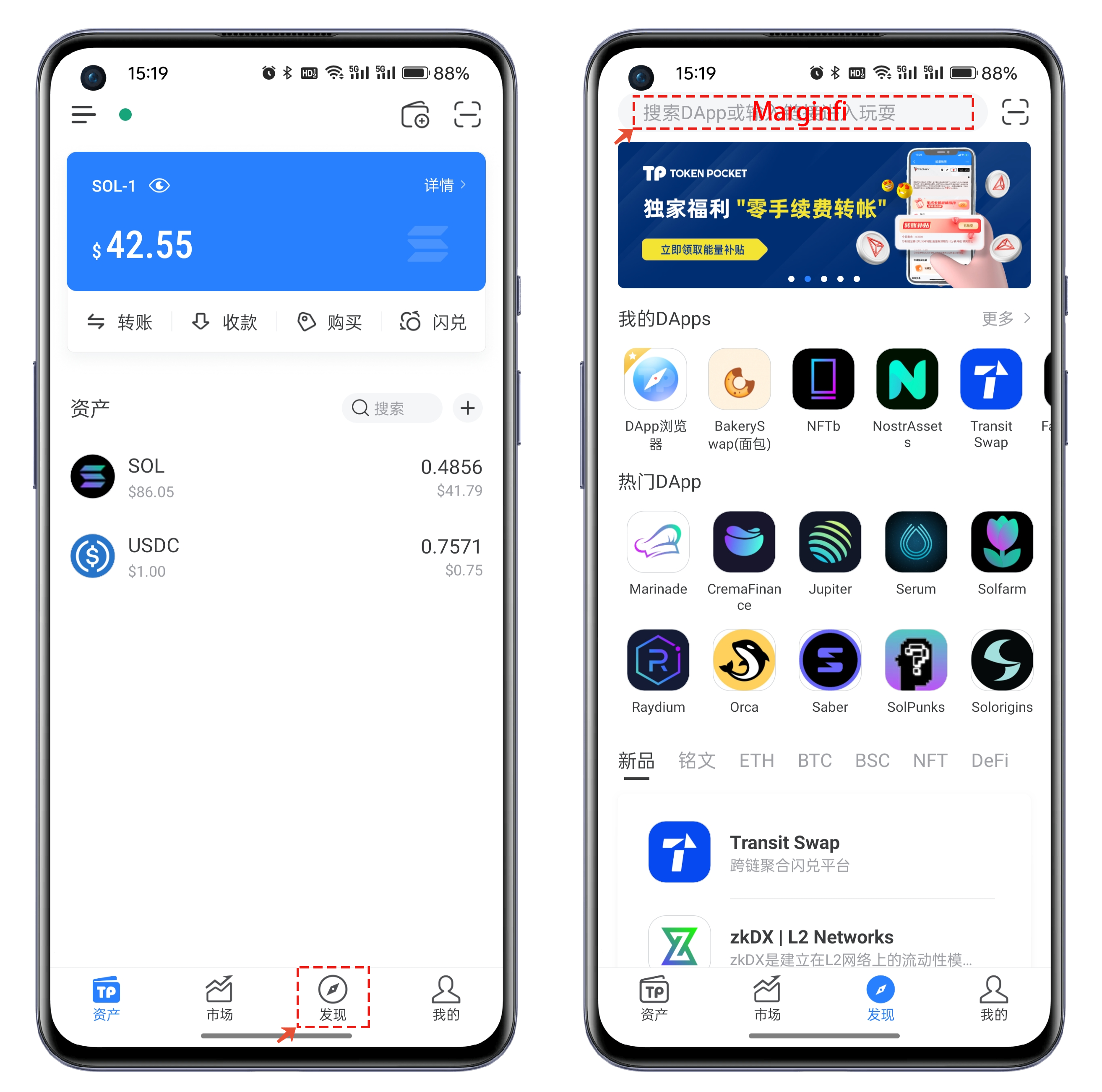
1、打开TokenPocket，选择【发现】，在顶部的地址栏中搜索【Marginfi】并打开。

<figure><img src="https://files.gitbook.com/v0/b/gitbook-x-prod.appspot.com/o/spaces%2FMr66Ca6n3UR4Xw7gcij2%2Fuploads%2Fw5US41Fss5sLe2CL3EWy%2F1.png?alt=media&#x26;token=ffcdabbb-6198-4cd8-becf-01a01282562a" alt=""><figcaption></figcaption></figure>

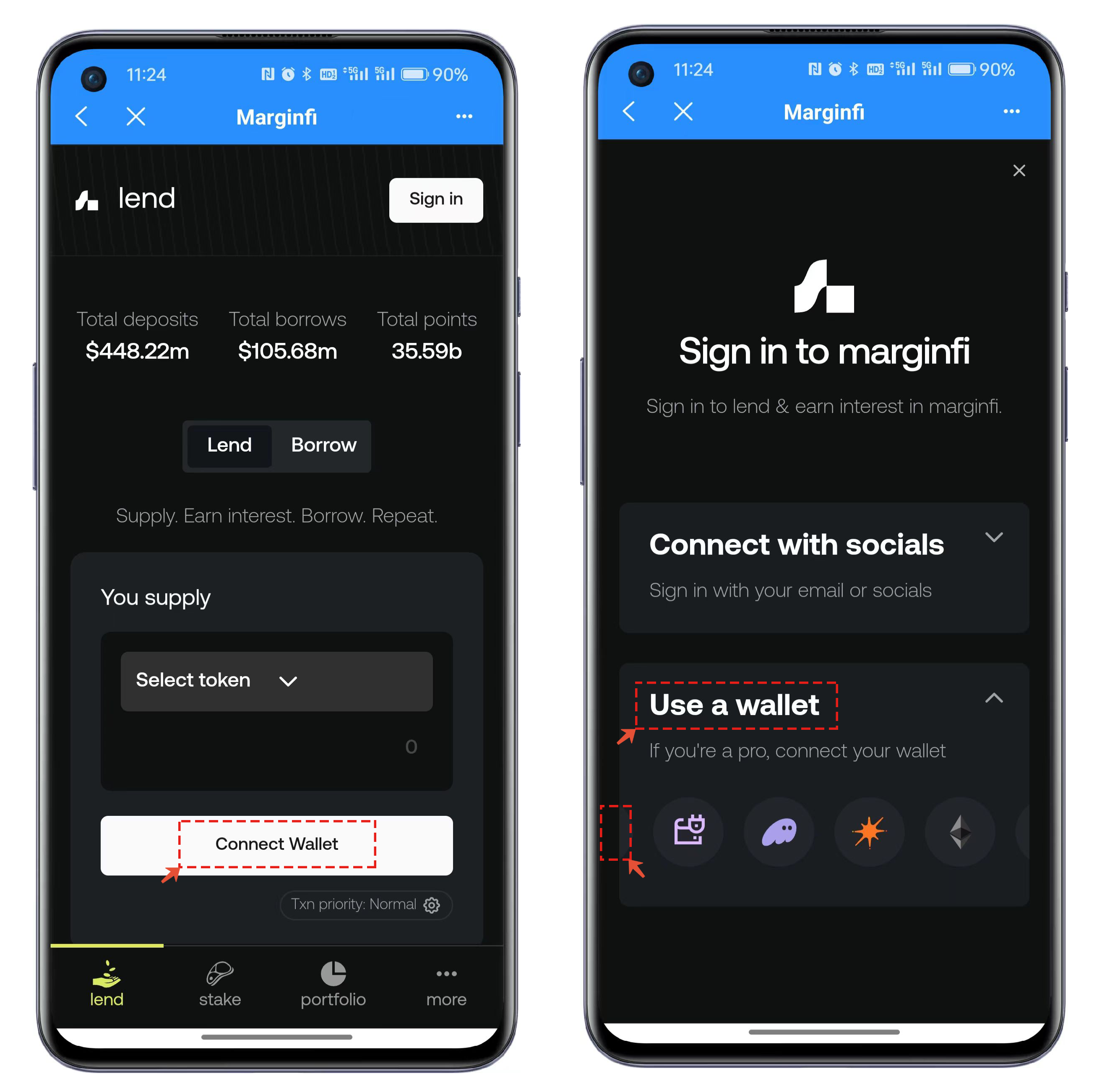
2、首次使用需要连接钱包，点击【Connect Wallet】，Marginfi中支持两种链接方式，教程中选择使用的是Wallet的连接方式，因为Marginfi客户端存在兼容性，所以第一个TokenPocket的图标并未完整展示，点击侧边的位置后就可以使用TokenPocket连接钱包。

<figure><img src="https://files.gitbook.com/v0/b/gitbook-x-prod.appspot.com/o/spaces%2FMr66Ca6n3UR4Xw7gcij2%2Fuploads%2FuWYmx6YJoezYJNdHz1ml%2F2.png?alt=media&#x26;token=ec9ce5b4-be61-4cac-a446-faa6fb094952" alt=""><figcaption></figcaption></figure>

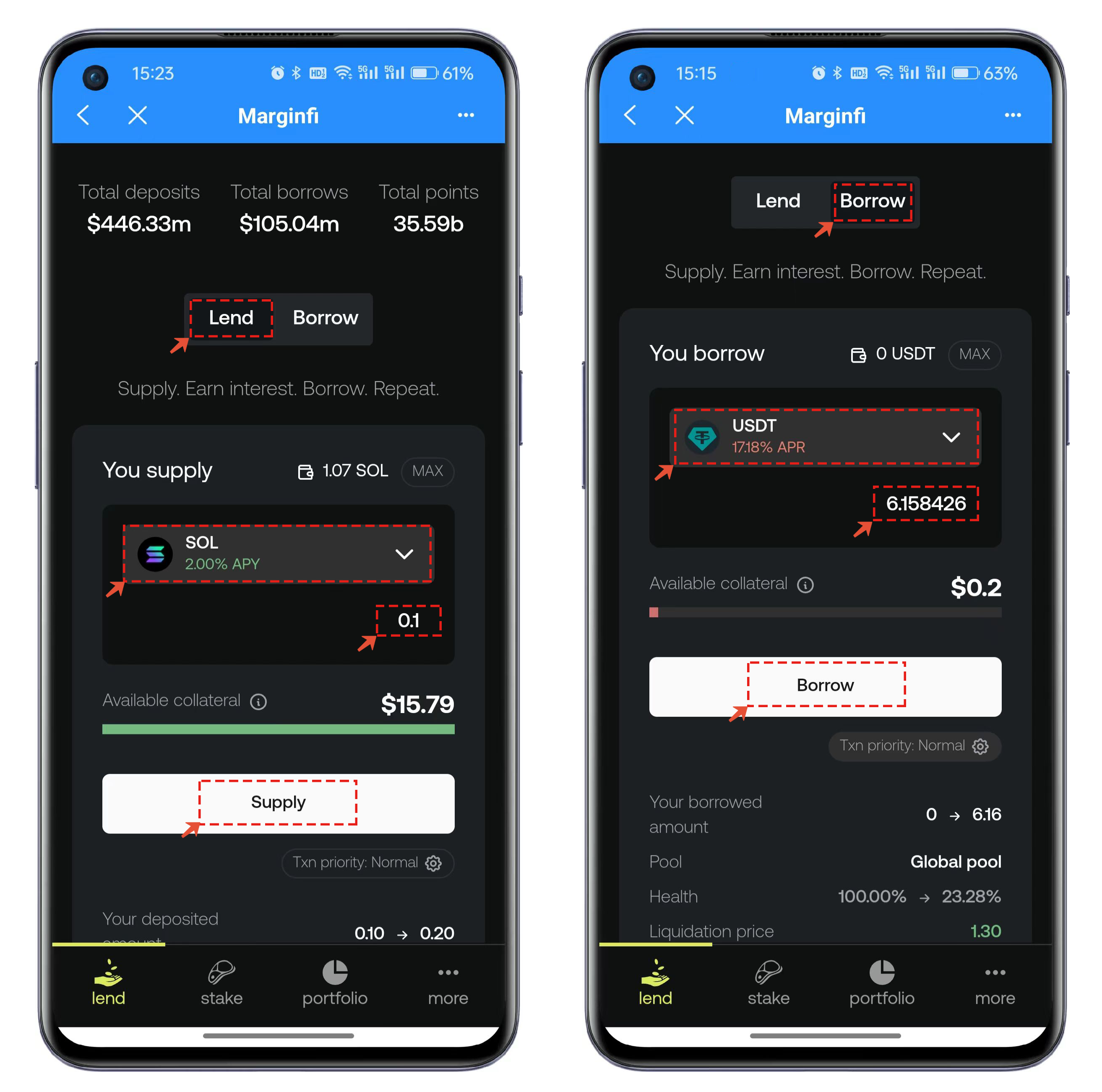
3、连接钱包后，默认界面为Lend，也就是借出（提供借款）功能，可以选择支持的代币种类并设置数量后点击【Supply】执行借出操作；待借出完成后，就可以点击Borrow界面进行借入功能，因为已经提供过代币的借出作为“抵押物”，所以可以选择其他的代币借出，同样设置好代币和数量后，点击Borrow执行上链操作。

<figure><img src="https://files.gitbook.com/v0/b/gitbook-x-prod.appspot.com/o/spaces%2FMr66Ca6n3UR4Xw7gcij2%2Fuploads%2F4kViL39LXBxzCi7hSGbi%2F3.png?alt=media&#x26;token=c630cd5e-8d32-4a4a-acbe-6d1118296cf9" alt=""><figcaption></figcaption></figure>

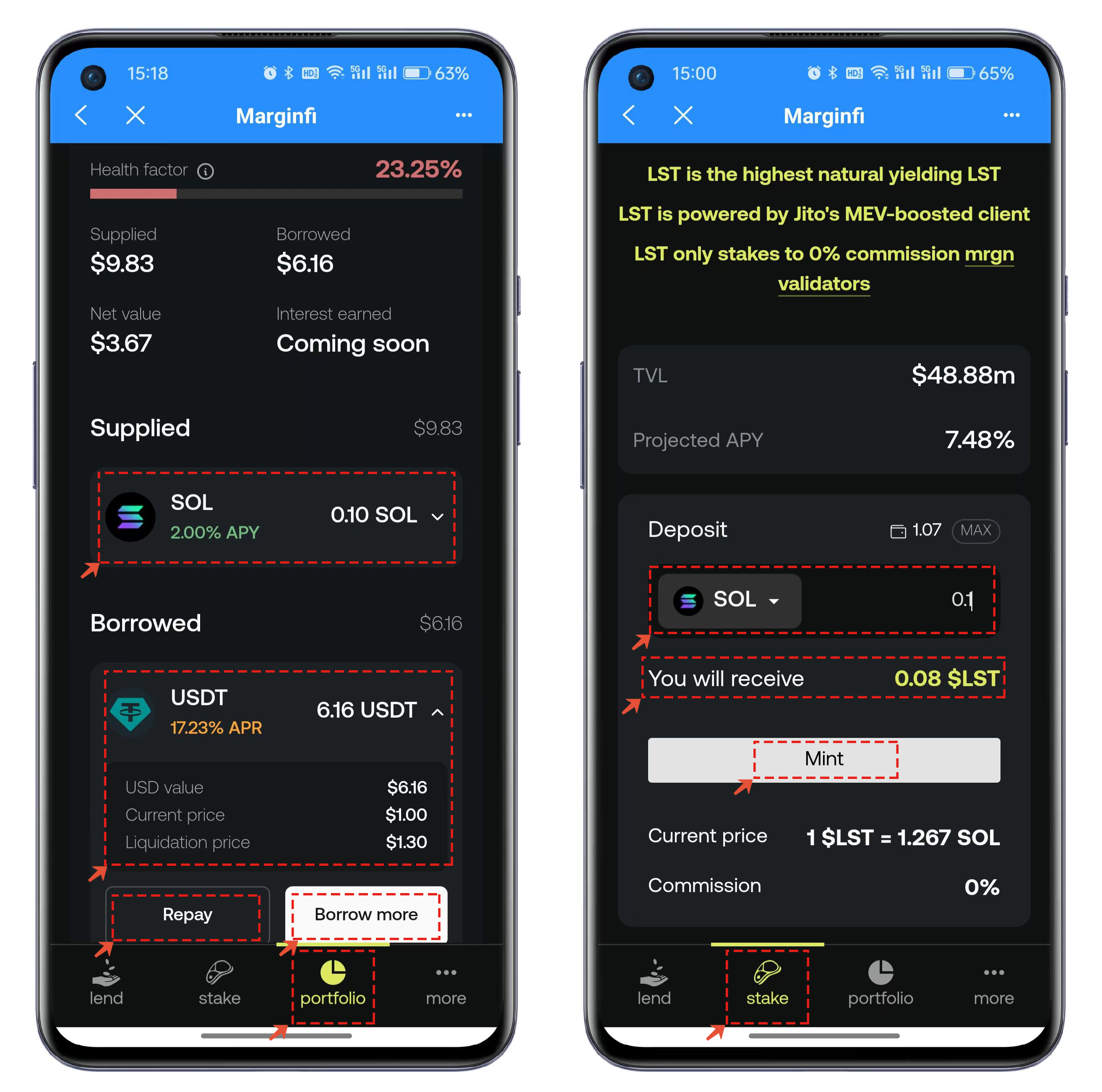
4、待操作完成后，可以点击底部的【Portfolio】功能查看积分和资产配置组合等情况，点击界面中已经参与（借出/借入）的记录，在这里可以选择相应的操作，例如这里的借入可以选择还款或者借入更多。

【Stake】功能可以直接把代币转换成LST资产，具体的可以查看界面中提示的LST相关使用规则。

<figure><img src="https://files.gitbook.com/v0/b/gitbook-x-prod.appspot.com/o/spaces%2FMr66Ca6n3UR4Xw7gcij2%2Fuploads%2FjLRxxOjWbUjUtxR1TNGp%2F4.png?alt=media&#x26;token=27c4dc2b-6fe2-4b99-94bb-759660842bda" alt=""><figcaption></figcaption></figure>

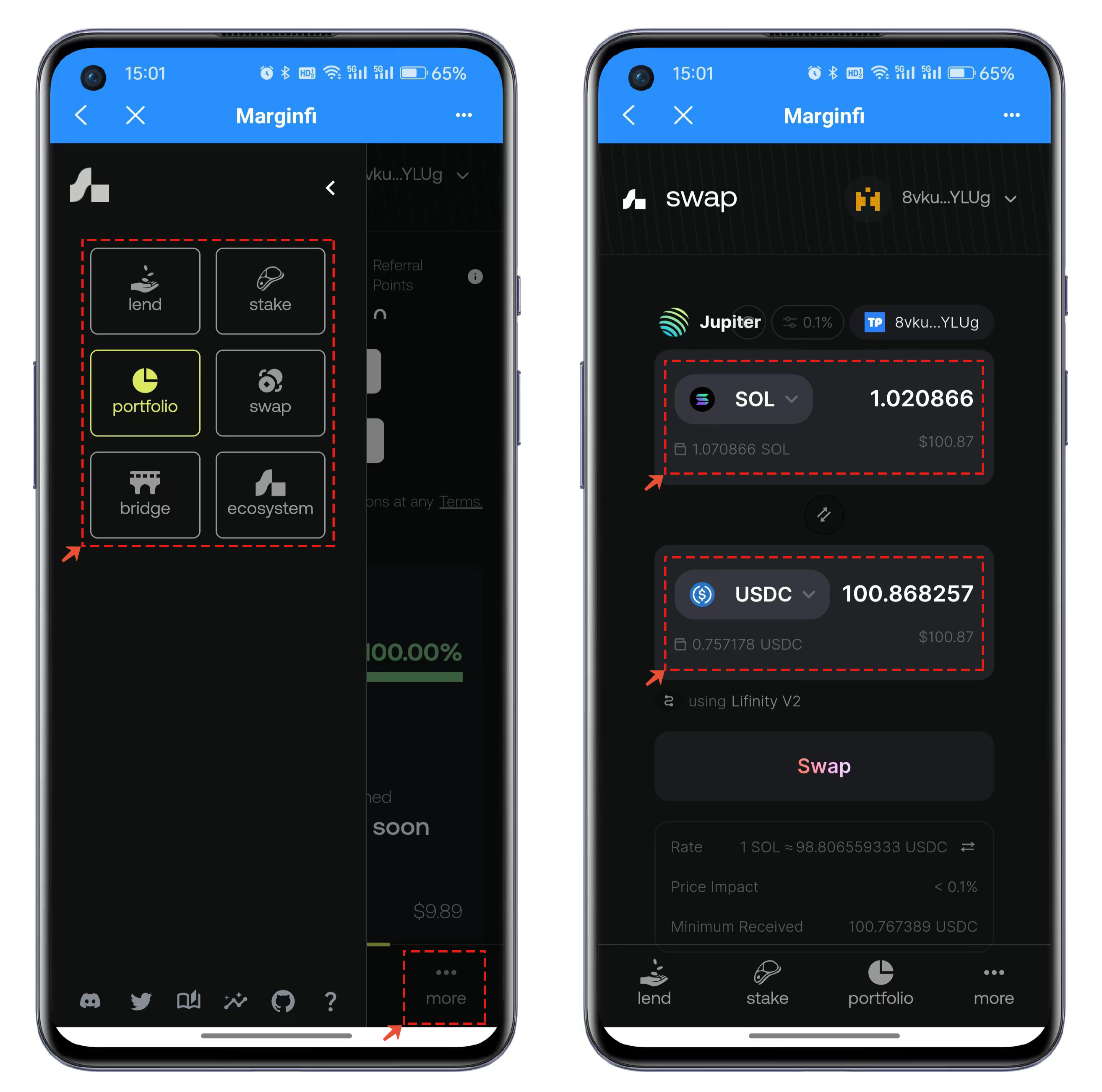
5、Marginfi中还集成了其他功能，例如swap、bridge等便捷功能，可以通过一个DApp来完成多种操作。

<figure><img src="https://files.gitbook.com/v0/b/gitbook-x-prod.appspot.com/o/spaces%2FMr66Ca6n3UR4Xw7gcij2%2Fuploads%2F497uG7mQZeBqoEHrOh3D%2F5.png?alt=media&#x26;token=09af628a-4341-4ab8-9226-a9dad1b5a0e7" alt=""><figcaption></figcaption></figure>


---

# Agent Instructions: Querying This Documentation

If you need additional information that is not directly available in this page, you can query the documentation dynamically by asking a question.

Perform an HTTP GET request on the current page URL with the `ask` query parameter:

```
GET https://help.tpwallet.io/cn/wallet-operation/how-to-trade-on-dex/marginfi.md?ask=<question>
```

The question should be specific, self-contained, and written in natural language.
The response will contain a direct answer to the question and relevant excerpts and sources from the documentation.

Use this mechanism when the answer is not explicitly present in the current page, you need clarification or additional context, or you want to retrieve related documentation sections.