# EOS-EVM公链代币兑换

EOS-EVM主网已经正式上线，TokenPocket也已经正式收录了这条公链，可以点击查看[<mark style="color:blue;">**EOS-EVM钱包创建教程**</mark>](/cn/wallet-operation/create-wallet-tutorial/eos-evm.md)。那么EOS公链的代币如何迁移到EOS-EVM主网呢，EOS官方给出了一个非常便捷的兑换方式，只需要把EOS代币转账到eosio.evm账号，并在memo中填写自己EOS-EVM钱包的地址，转账数量需要大于0.01eos，因为兑换会收取0.01eos的手续费用。

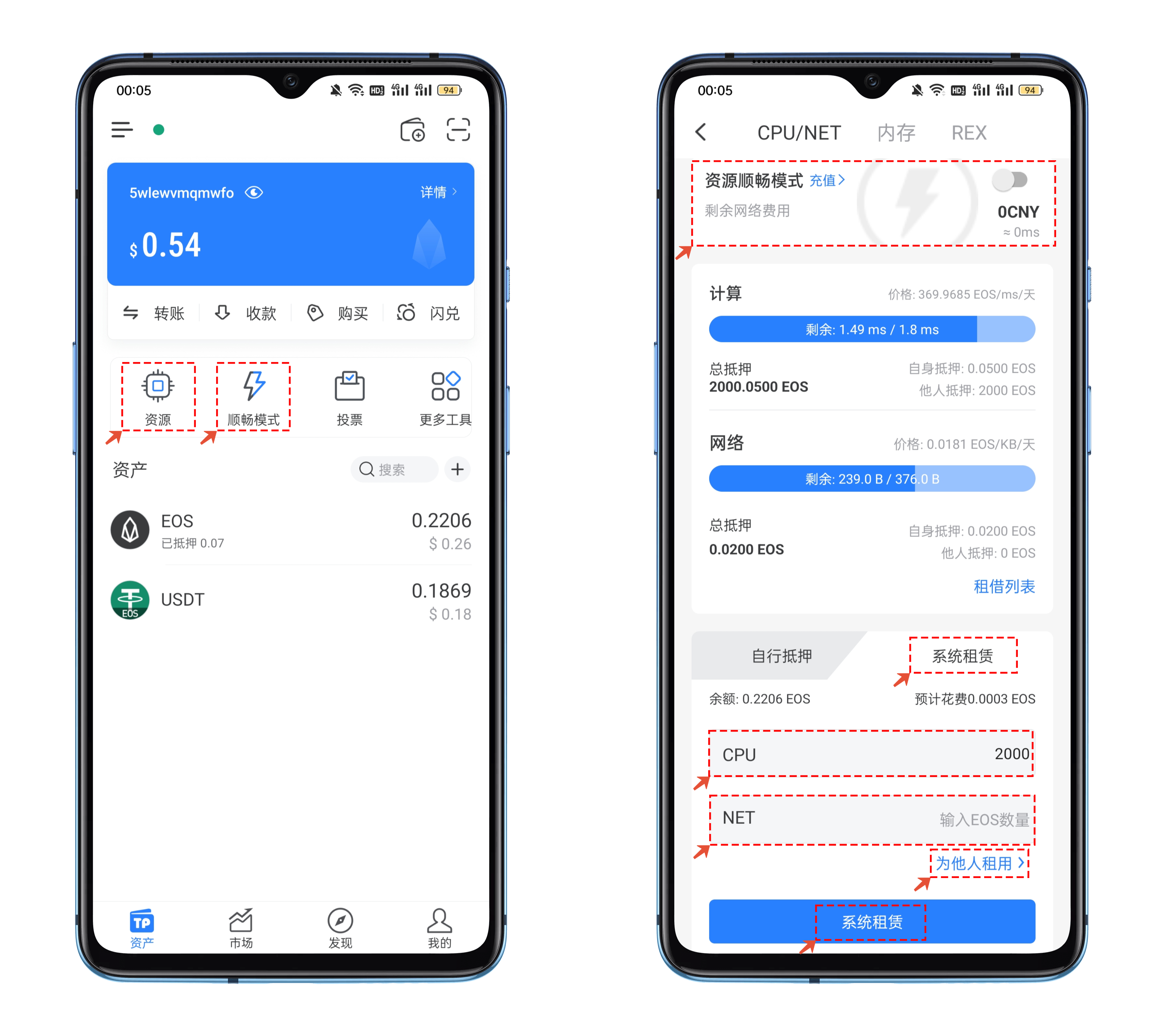
1、打开TokenPocket，在工具栏中可以先通过【资源】菜单检查自己的资源是否足够，因为EOS公链的机制很特别，所以可以通过TokenPocket独有的【顺畅模式】或者通过【系统租赁】的方式来获取足够的资源，这里尤其需要质押的就是【计算资源】，系统租赁的费用非常低廉，也可以帮他人租赁。

<figure><img src="https://files.gitbook.com/v0/b/gitbook-x-prod.appspot.com/o/spaces%2F-MMF2k4MCaxErpZyah2d%2Fuploads%2Fo3QG836s56dmVySzulT5%2F1.png?alt=media&#x26;token=855811c0-dc4a-4b93-9802-e07115305e5f" alt=""><figcaption></figcaption></figure>

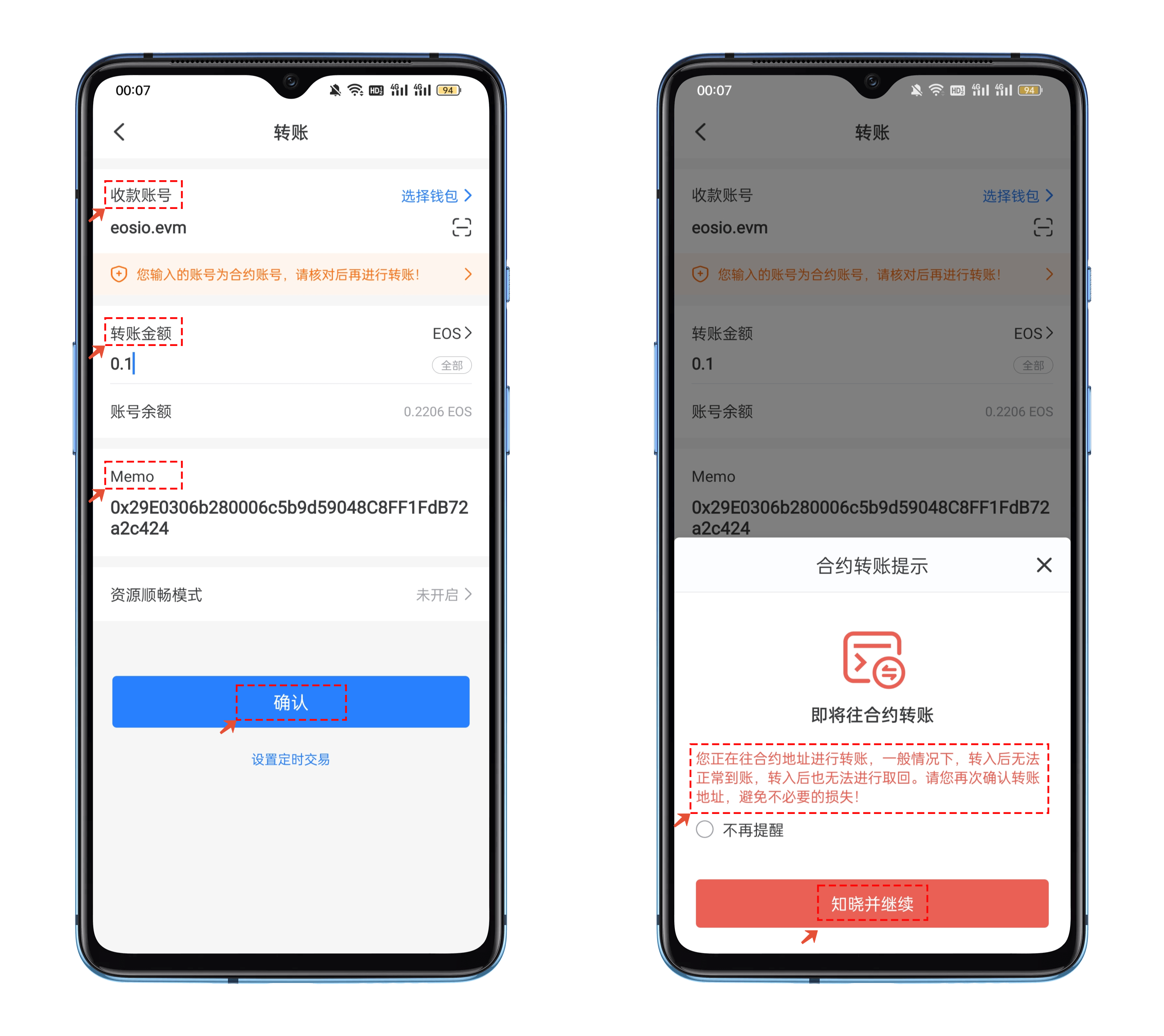
2、接下来点击eos来到转账界面，在收款地址栏中填入<mark style="color:red;">**eosio.evmin**</mark> ，转账金额设置大于0.01eos的数量，在Momo中填入自己的EOS-EVM钱包地址，核对信息后点击【确认】，会弹出即将转入合约地址的提示信息，这里是正常的提示，点击【知晓并继续】

<figure><img src="https://files.gitbook.com/v0/b/gitbook-x-prod.appspot.com/o/spaces%2F-MMF2k4MCaxErpZyah2d%2Fuploads%2FvcUNf42fKilsF77NqyCE%2F2.png?alt=media&#x26;token=bc3b0e3f-fe84-455a-bd00-515fa8b26b11" alt=""><figcaption></figcaption></figure>

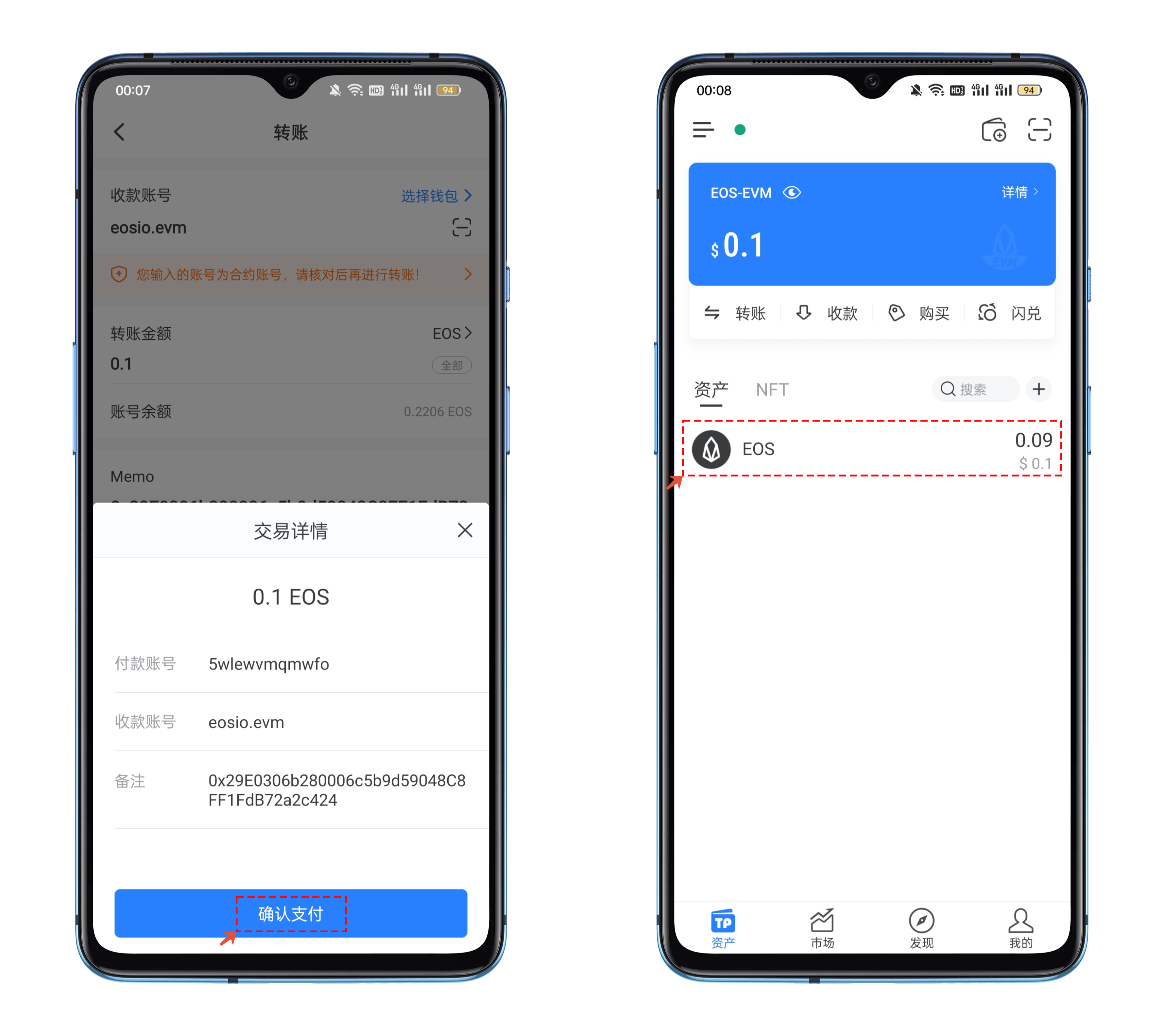
3、在交易详情中再次核对收款地址和memo内容，最终点击【确认支付】并签名后即可转出eos，这个方法的兑换速度非常的快，切换到EOS-EVM钱包中就可以看到兑换到账的eos数量，手续费会扣除0.01eos。

<figure><img src="https://files.gitbook.com/v0/b/gitbook-x-prod.appspot.com/o/spaces%2F-MMF2k4MCaxErpZyah2d%2Fuploads%2FTXtkZf2yX3o4QZD6ipwv%2F3.png?alt=media&#x26;token=a965afed-fe3d-409a-81f1-ecc35bd8cf2e" alt=""><figcaption></figcaption></figure>


---

# Agent Instructions: Querying This Documentation

If you need additional information that is not directly available in this page, you can query the documentation dynamically by asking a question.

Perform an HTTP GET request on the current page URL with the `ask` query parameter:

```
GET https://help.tpwallet.io/cn/wallet-operation/how-to-trade-on-dex/eos-1.md?ask=<question>
```

The question should be specific, self-contained, and written in natural language.
The response will contain a direct answer to the question and relevant excerpts and sources from the documentation.

Use this mechanism when the answer is not explicitly present in the current page, you need clarification or additional context, or you want to retrieve related documentation sections.