# 如何查看地址多签状态

打开波场区块链浏览器<https://tronscan.org/#/> 在地址栏中填入自己的钱包地址回车查看，查询地址上方没有出现提示信息，那么这种就是正常的单签名权限。

<figure><img src="/files/Q8kLThiCENQHBSM6xDc9" alt=""><figcaption></figcaption></figure>

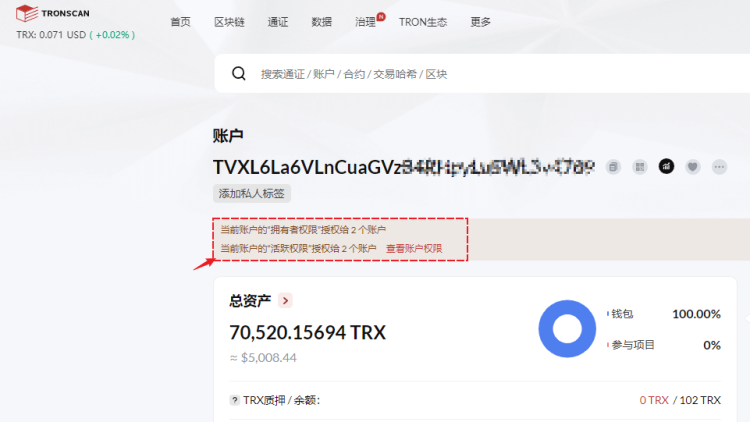
如果填入地址后查询结果中看到了提示信息，那么就说明现在的地址权限属于多签名的状态。

<figure><img src="/files/QgCir1wjC1L3aOxTi5VJ" alt=""><figcaption></figcaption></figure>

点击查看账户权限中的阈值和权重就知道管理地址的信息。

<figure><img src="/files/JxFYRlg54ePeYxhRWZaa" alt=""><figcaption></figcaption></figure>

使用Tron浏览器，可以通过页面最底部切换不同的语言环境使用。


---

# Agent Instructions: Querying This Documentation

If you need additional information that is not directly available in this page, you can query the documentation dynamically by asking a question.

Perform an HTTP GET request on the current page URL with the `ask` query parameter:

```
GET https://help.tpwallet.io/cn/wallet-management/blockchain-explorer-tutorial/tron-explorer-tutorial/status-check.md?ask=<question>
```

The question should be specific, self-contained, and written in natural language.
The response will contain a direct answer to the question and relevant excerpts and sources from the documentation.

Use this mechanism when the answer is not explicitly present in the current page, you need clarification or additional context, or you want to retrieve related documentation sections.